How to Document Equipment Days So Adjusters Don't Cut Them
Water mitigation invoices bill dehumidifiers, air movers and air scrubbers by the day, and the days with no record behind them are the first ones an adjuster questions. Here's how to build an equipment days record that holds up, one scan at a time.
Why Equipment Days Get Cut
Drying equipment is billed per unit, per day. On a big loss that adds up fast, so equipment charges get a close look when the estimate is reviewed.
The questions are usually simple. How many units were on site? When did each one arrive, and when did it leave? Was it still running after the structure was dry? If your answer is a technician's memory or a whiteboard back at the shop, the days you can't show are the easiest ones to take off the invoice.
Good equipment days documentation answers those questions before they're asked: a dated record for every unit, tied to the claim, from drop-off to pickup.
The questions are usually simple. How many units were on site? When did each one arrive, and when did it leave? Was it still running after the structure was dry? If your answer is a technician's memory or a whiteboard back at the shop, the days you can't show are the easiest ones to take off the invoice.
Good equipment days documentation answers those questions before they're asked: a dated record for every unit, tied to the claim, from drop-off to pickup.
Equipment Days Documentation Starts at Drop-Off
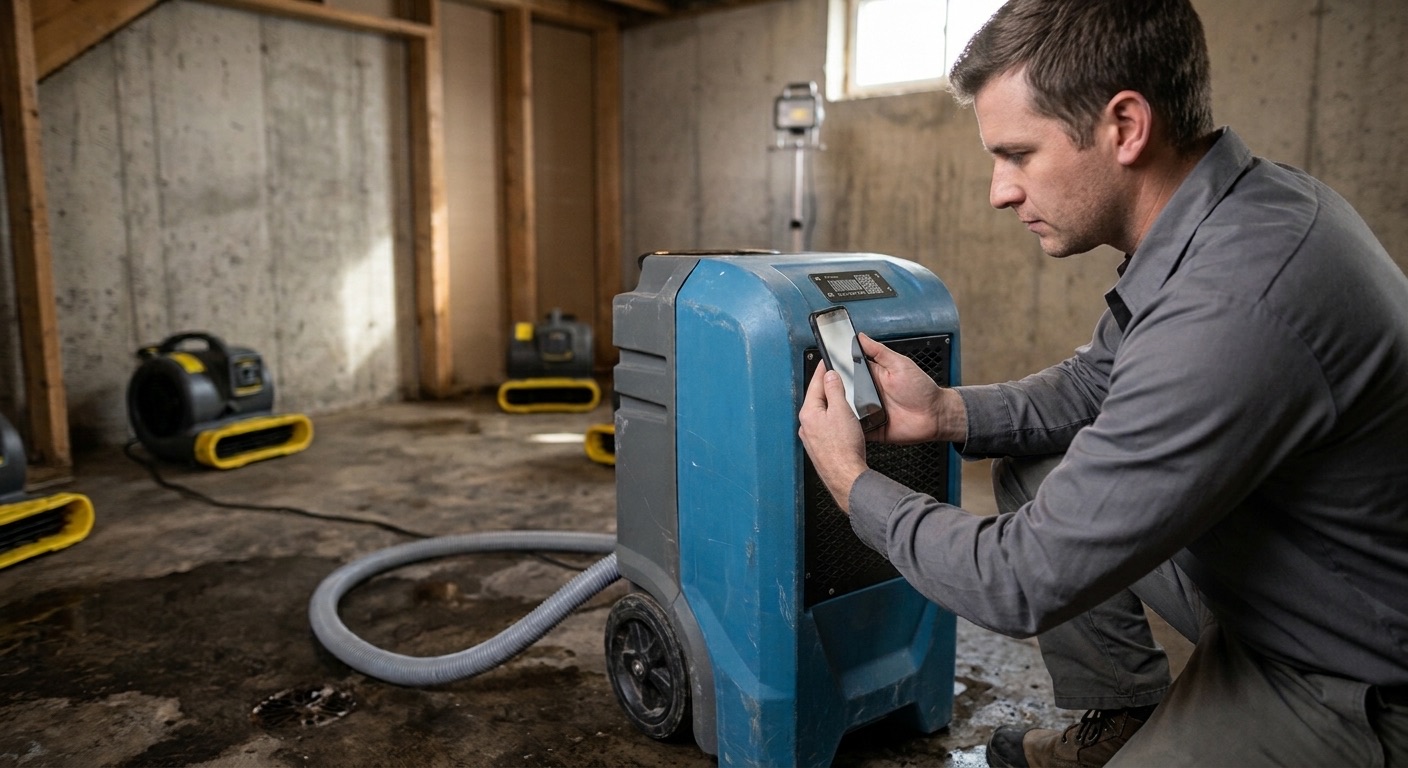
The record starts when a unit goes into the house. With a QR tag riveted to each dehumidifier, air mover and scrubber, the technician scans the tag with their phone's camera, enters their 6-digit PIN, taps Checked-Out and picks the job site. There's no app to install.
The job site holds the claim number, so it never gets typed again. The closest job sites show first, using the phone's GPS. Every scan saves who scanned it, the date and time, and the GPS location, so the drop-off is recorded at the property, not filled in later.
The job site holds the claim number, so it never gets typed again. The closest job sites show first, using the phone's GPS. Every scan saves who scanned it, the date and time, and the GPS location, so the drop-off is recorded at the property, not filled in later.
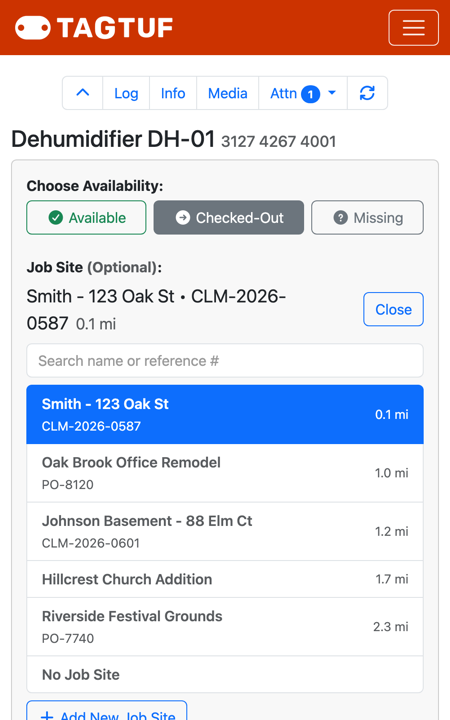
Checking a dehumidifier out to the claim: the closest job sites show first
Daily Checks Make the Record Continuous
A drop-off and a pickup with nothing in between leaves a gap an adjuster can question. A quick scan at each monitoring visit fills it in. Mark Inspection Done, add a note if something changed (a unit moved to another room, a filter swapped) and attach a photo if it helps.
Each check lands in the unit's history with the job site, the time and a GPS stamp. A week of daily checks reads like a log of the job, because it is one.
Each check lands in the unit's history with the job site, the time and a GPS stamp. A week of daily checks reads like a log of the job, because it is one.
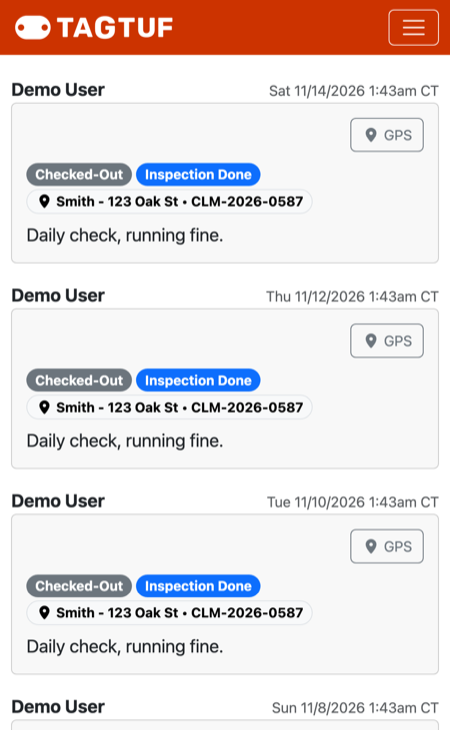
A dehumidifier's daily checks, each with the job site, time and GPS
Pickup Closes the Span
When a unit comes off the job, scan it as Available and its days on that claim end. If a unit moves straight from one loss to another, check it out to the new job site and the days split cleanly between the two claims.
If a unit can't be found at pickup, mark it Missing. Its days stop counting, the entry keeps the job site where it went missing, and it shows up on the missing list so it doesn't sit forgotten at a finished job.
If a unit can't be found at pickup, mark it Missing. Its days stop counting, the entry keeps the job site where it went missing, and it shows up on the missing list so it doesn't sit forgotten at a finished job.
Count the Days the Same Way Every Time
Disputes often start with arithmetic. TagTuf counts equipment days as calendar days touched, in your company's time zone: a unit dropped off Monday at 3pm and picked up Wednesday at 9am is 3 days.
The Equipment Days report lists every unit on a job site with its check-out time, check-in time (or still out) and days, plus a total per model. Pick a date range or a month to see only the days inside it, and export the report to CSV for the invoice.
The Equipment Days report lists every unit on a job site with its check-out time, check-in time (or still out) and days, plus a total per model. Pick a date range or a month to see only the days inside it, and export the report to CSV for the invoice.
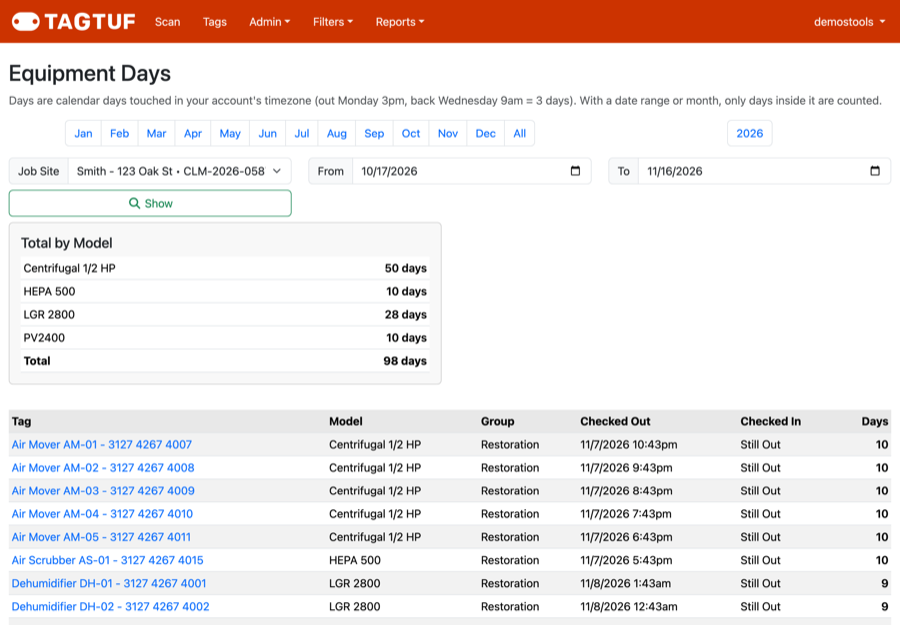
Equipment Days report for one claim, with totals per model
Send the Adjuster the Record
Add the adjuster's or property manager's email to the job site, and when the job wraps up, send the final report: the equipment days and the full history for that site in one email. If something gets corrected, send it again.
If they'd rather check in during the job, turn on the job site's share link. It shows the units on site and their history, with no login.
If they'd rather check in during the job, turn on the job site's share link. It shows the units on site and their history, with no login.
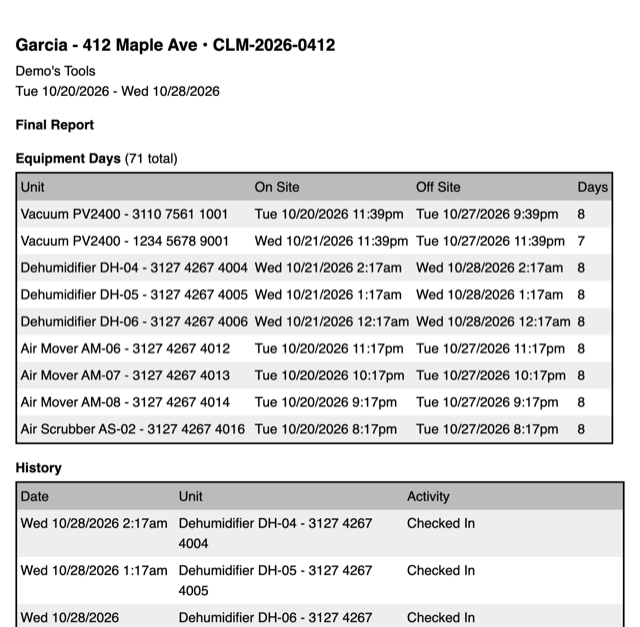
The final report email: equipment days and history for the job site
Put It on Every Unit
None of this needs a new routine. The crew already handles every unit at drop-off, during monitoring and at pickup. A scan at each of those moments turns that work into documentation the adjuster can check.
See how it fits a restoration company's whole workflow: https://www.tagtuf.com/blog/post/Restoration
See how it fits a restoration company's whole workflow: https://www.tagtuf.com/blog/post/Restoration