Out Too Long and Missing Equipment
Two lists catch equipment before it's lost for good: Out Too Long (checked out with no scan for a week) and Missing (someone couldn't find it).
Out Too Long
A tag is Out Too Long when it's checked out and nobody has scanned it for 7 days. That usually means it was left at a finished job or moved without a scan.
Any scan clears it: a daily check, a service, or a check-in.
Any scan clears it: a daily check, a service, or a check-in.
Where to See Them
On any tag page, tap Attn at the top. It shows counts for Missing, Inspection, Service and Out Too Long, for your team and for all teams. Tap one to see those tags.
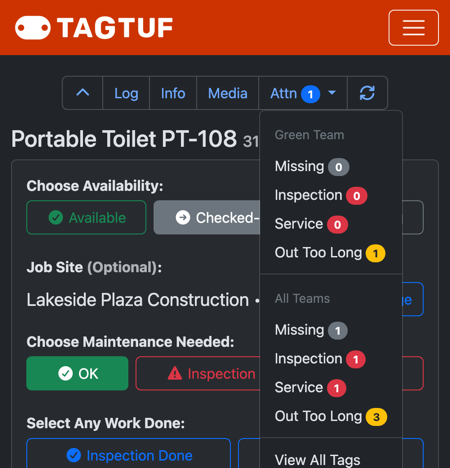
The Attn menu: counts for your team and for all teams
Missing
When someone marks a tag Missing, it keeps the job site it went missing from and shows under Missing on the Tags list and in the Attn menu. Users with "Notify Upon Missing Item" turned on get an email or text.
When it turns up, scan it as Available or Checked-Out and it drops off the list.
When it turns up, scan it as Available or Checked-Out and it drops off the list.
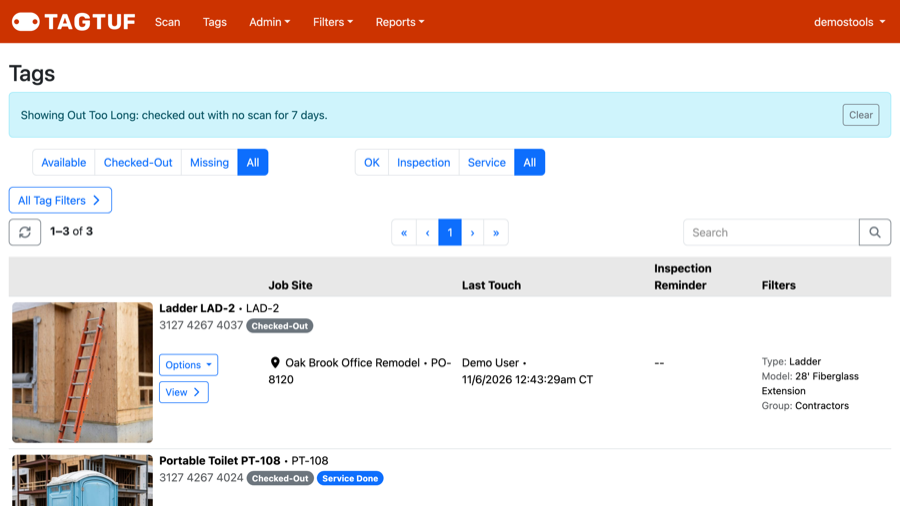
Out Too Long on the Tags list
Make It a Habit
A quick look at the Attn menu once a week, and at Ready to Close on the Job Sites list, catches most lost equipment while it's still easy to find.
Comments
No Comments Yet