Reporting Maintenance Needed and Work Done
The same scan that checks equipment in and out also tracks maintenance: flag what a unit needs, and log the work when it's done.
Flag What It Needs
Under Choose Maintenance Needed:
OK: nothing needed.
Inspection: it needs to be inspected.
Service: it needs repair or service.
Pick one, add a note saying what's wrong, and tap Submit. The tag shows the red Inspection or Service badge until someone sets it back to OK, and it appears under Inspection or Service on the Tags list and in the Attn menu.
OK: nothing needed.
Inspection: it needs to be inspected.
Service: it needs repair or service.
Pick one, add a note saying what's wrong, and tap Submit. The tag shows the red Inspection or Service badge until someone sets it back to OK, and it appears under Inspection or Service on the Tags list and in the Attn menu.
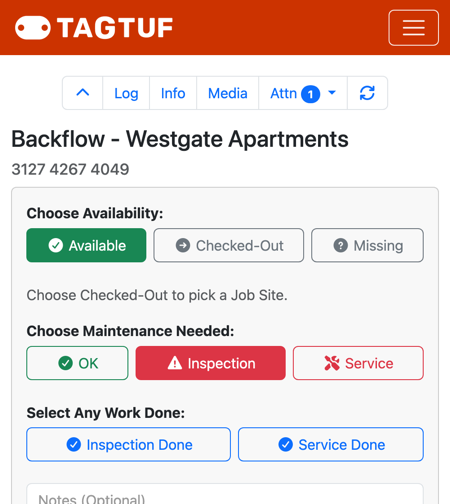
A tag flagged as needing inspection
Log the Work When It's Done
1. Scan the tag and enter your PIN.
2. Under Select Any Work Done, tap Inspection Done or Service Done (or both).
3. Set Choose Maintenance Needed back to OK.
4. Add a note about what you did ("replaced the filter", "passed monthly inspection") and a photo if it helps.
5. Tap Submit.
The entry shows in the tag's history with an Inspection Done or Service Done badge, who did it and when.
2. Under Select Any Work Done, tap Inspection Done or Service Done (or both).
3. Set Choose Maintenance Needed back to OK.
4. Add a note about what you did ("replaced the filter", "passed monthly inspection") and a photo if it helps.
5. Tap Submit.
The entry shows in the tag's history with an Inspection Done or Service Done badge, who did it and when.
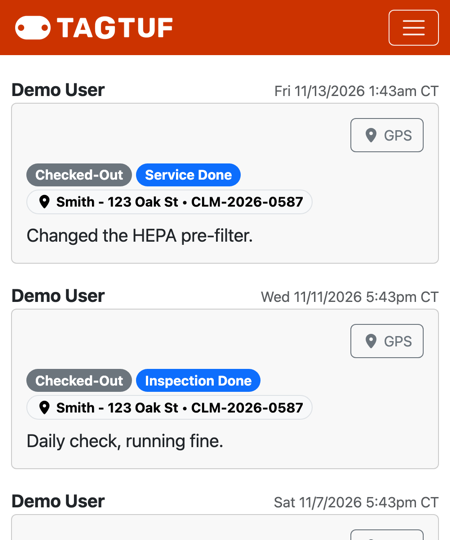
Service Done and Inspection Done entries in a tag's history
Inspection Reminders
If you've set up inspection reminders, a reminder marks the tag as needing inspection on its schedule. Do the inspection, then scan with OK and Inspection Done as above. The schedule itself stays the same (for example, the 1st of every month).
Who Hears About It
Users who turned on "Notify Upon Inspection/Service Needed or Done" (under Admin > Users > Notifications) get an email or text when a tag is flagged or the work is logged, for all tags or just their team's.
Comments
No Comments Yet