Showing Last Service on the Public Tag Page
Turn this on and anyone who scans a tag sees when it was last serviced and when it's due next, without a PIN. Handy for portable toilets and installed equipment.
Turn It On
1. Open the menu under your username and go to Account Settings.
2. Under Public Tag Page, check Show Last Service On The Public Tag Page.
3. Tap Save.
It applies to every tag on your account.
2. Under Public Tag Page, check Show Last Service On The Public Tag Page.
3. Tap Save.
It applies to every tag on your account.

Account Settings > Public Tag Page
What People See
Last Serviced: the date of the latest Service Done or Inspection Done scan, with the initials of who did it.
Next Service Due: the next inspection reminder date, if the tag has a reminder schedule. If the tag is flagged as needing inspection, it shows Service Overdue instead.
Notes, photos, GPS, job sites and the rest of the history stay behind the PIN.
Next Service Due: the next inspection reminder date, if the tag has a reminder schedule. If the tag is flagged as needing inspection, it shows Service Overdue instead.
Notes, photos, GPS, job sites and the rest of the history stay behind the PIN.
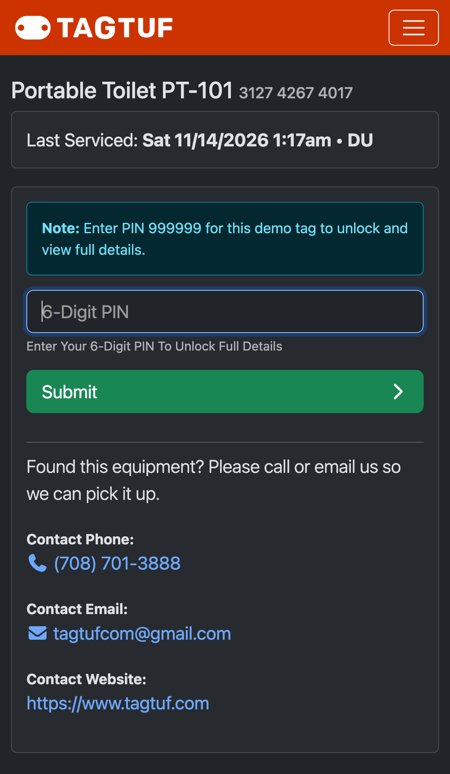
The public tag page with Last Serviced
When to Use It
It's good when the people around your equipment should see it's being serviced: event staff and contractors around portable toilets, or a homeowner looking at the water heater you installed. Restoration companies usually leave it off.
Comments
No Comments Yet